Integrate Application Security with GitLab
Scan for vulnerabilities and prevent potential exploits before publishing changes to your production environment by using the Application Security integration with GitLab.
Integrate your Application Security scans into your GitLab CI/CD pipeline by including the scanning steps, which will then automate a DAST scan as part of that build.
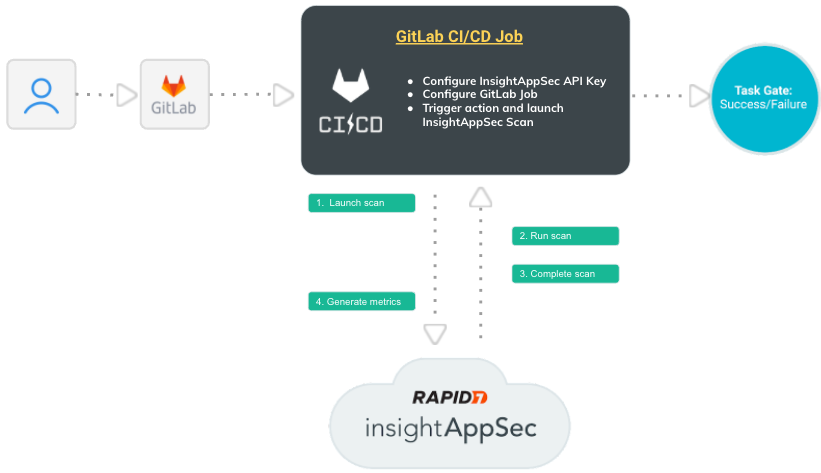
 How does this integration work?
Let’s walk through the interactions between GitLab and Application Security to better understand this integration.
- An event triggers the CI/CD pipeline in GitLab.
- GitLab sends a scan request to Application Security .
- The scan runs in Application Security . You can view scan progress in Application Security and build progress in GitLab.
- After the scan completes, Application Security sends the scan results back to GitLab, where you can view a summary of the results.
You can add scan gating to prevent vulnerable code from being deployed to production.
What you’ll need
To make your configuration easier, have the following pieces of information available:
- Application Security API key. Add the Application Security API Key as a secret in your GitLab variables, otherwise the action will fail.
- Scan Config ID of the Application Security scan that you want to run
Configure your CI/CD pipeline for Application Security scans
Configuration options and descriptions
| Field | Description | Required? |
|---|---|---|
image
|
rapid7/insightappsec-gitlab-scan:latest This is a path to the Rapid7 dockerhub image, from which the pipeline will run. :latest ensures that you always have the latest version of the image. |
Required |
script
|
python3 /insightappsec_scan/actions.py This runs the integration. |
Required |
TOKEN (API Key) |
Application Security API key. Added as a Gitlab variable. | Required |
SCAN_CONFIG_ID
|
Scan config ID from IAS. | Required |
REGION
|
Deployment region | Required |
FAIL_ON_VULN_FINDINGS
|
True or False Determines what happens to the pipeline if vulnerabilities are found. The default value is True |
Optional |
WAIT_FOR_SCAN_COMPLETE
|
True or False Determiners if the build will wait on the scan completing or just start a scan that can be reviewed later. The default value is True |
Optional |
VULN_QUERY
|
Scan gating query, which uses parameters from the Application Security Search endpoint. | Optional |
LOG_LEVEL
|
Defines the log level. Options are debug, info, warn, error, fatal, and panic. The default is info. | Optional |
TIMEOUT
|
Scan timeout in minutes, if limit is reached the scan will be canceled and pipeline fail. | Optional |
-
Access the Rapid7 Application Security step from Dockerhub. The docker image is included in the pipeline through the
imagefield in the pipeline YAML. -
In the GitLab CI/CD Editor, add the following stage, using your own details:
stages:
  - scan

scan:
  image: rapid7/insightappsec-gitlab-scan:latest
  stage: scan
  script:
    - python3 /insightappsec_scan/actions.py --TOKEN="${IAS_API_KEY}" --SCAN_CONFIG_ID="${SCAN_CONFIG_ID}" --REGION="${REGION}" --FAIL_ON_VULN_FINDINGS="${FAIL_ON_VULN_FINDINGS}" --WAIT_FOR_SCAN_COMPLETE="${WAIT_FOR_SCAN_COMPLETE}" --VULN_QUERY="${VULN_QUERY}" --LOG_LEVEL="${LOG_LEVEL}" --TIMEOUT="${TIMEOUT}"
  variables:
    REGION: us
    SCAN_CONFIG_ID: 187a1863-8f1a-4a85-92a6-14d41613deb3
    vuln-query: "vulnerability.severity = 'HIGH'"
FAIL_ON_VULN_FINDINGS: "false"The image reference ends with :latest to ensure that you always have the latest version.
You can add scan gating to prevent vulnerable code from being deployed to production.
Scan gating
You can set gating criteria with this integration to prevent risky code from entering your production environment. One way to use scan gating is to set build pass/fail criteria for vulnerabilities. When the scan finds vulnerabilities that meet or exceed your gating criteria, you can set a step to follow, such as failing the workflow so that code is not deployed to production.
If you set the FAIL_ON_VULN_FINDINGS option to true and results in (VULN_QUERY) match this criteria, then the integration will optionally fail the build.
The scan gating query can be anything the search vulnerability endpoint can accept, not just limited to severity. For more information, see the Application Security API documentation.
View results
During the scan, you can view scan progress in both GitLab and Application Security on the Scanning Activity page. When the scan completes and the results are automatically sent back to GitLab, you can view your results in the build results and in Application Security .