Add Application Security scans into your GitHub workflow
Scan for vulnerabilities and prevent potential exploits before publishing changes to your production environment by using the Application Security integration with GitHub Actions.
You can include Application Security scans in your CI/CD build pipeline workflow by adding the scan action and subsequent steps to your GitHub workflow.
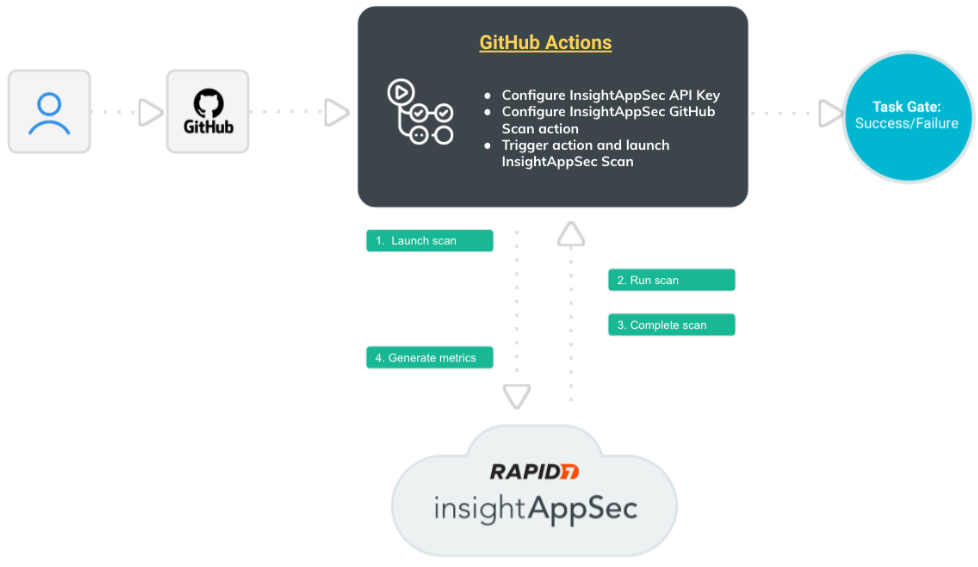
 How does this integration work?
Let’s walk through the interactions between GitHub, GitHub Actions, and Application Security to better understand this integration.
- An event in GitHub triggers the workflow in GitHub Actions.
- GitHub Actions sends a scan request to Application Security .
- The scan runs in Application Security . You can view progress in both Application Security and GitHub.
- After the scan completes, Application Security sends the scan results back to GitHub, where you can view a summary of the results.
- The workflow advances. You can add scan gating to prevent vulnerable code from being deployed to production. If there are results from the
vuln-query, the job is marked as failed.
Scan gating
You can set gating criteria with this integration to prevent risky code from entering your production environment. One way to use scan gating is to set build pass/fail criteria for vulnerabilities. When the scan finds vulnerabilities that meet or exceed your gating criteria, you can set a step to follow, such as failing the workflow so that code is not deployed to production.
The scan gating query can be anything the search vulnerability endpoint can accept, not just limited to severity. For more information, see the Application Security API documentation.
Example: Use scan gating to prevent vulnerable code from being deployed to production.
In this example, we will create a workflow with scan gating so that the build will fail if high severity vulnerabilities are discovered in the scan.
Add a workflow
- In your GitHub repository, click the Actions tab.
- Customize and add the following to a new yaml workflow file, using the
vuln-queryfield to set gating criteria:
name: IAS Scan
on:
  push:
    branches: [ master ]
jobs:
  scan:
    runs-on: ubuntu-latest
    steps:
      - id: my-scan
        uses: rapid7/insightappsec-scan-github-actions@v1.1.0
        with:
          region: "us"
          api-key: ${{ secrets.IAS_API_KEY }}
          scan-config-id: "999703e4-a4p0-4ea6-a3sc-53cg789e4fc1"
          vuln-query: "vulnerability.severity = 'HIGH'"
      - name: Upload findings
        if: always()
        run: echo "${{ steps.my-scan.outputs.scan-findings }}"
Run a build
- Commit to GitHub. The commit starts the build workflow in GitHub Actions.
- In GitHub Actions, the actions are built and deployed. GitHub Actions sends a scan request to Application Security .
- The scan runs in Application Security . You can view progress in both Application Security and GitHub.
- After the scan completes, Application Security sends the scan results back to GitHub. Depending on your scan and actions configurations, one of the following happens:
- If there are no vulnerabilities that meet your gating criteria, the workflow completes and is published to production.
- If there are one or more vulnerabilities that match your gating criteria, the workflow fails which, in this case, is severity = High.
What you’ll need
To make your configuration easier, have the following pieces of information available:
- Application Security API key
- Scan Config ID of the Application Security scan that you want to run
Integrate Application Security in GitHub
Add the Application Security API Key as a secret in GitHub, otherwise the action won’t work. See the GitHub documentation for information about adding API keys as secrets: https://docs.github.com/en/actions/security-guides/encrypted-secrets
Access the Rapid7 Application Security action in one of the following ways:
- Search for Rapid7 in the GitHub Marketplace. Select Application Security Scan and click Use Latest Version.
- Go directly to the Rapid7 repository for the action.
Add the Application Security scan as an action to your GitHub workflow
In your GitHub workflow YML file, add the following to the jobs: section, using your own details:
scan:
  runs-on: ubuntu-latest
  steps:
    - id: my-scan
      uses: rapid7/insightappsec-scan-github-actions@v1.1.0
      with:
        region: "us"
        api-key: ${{ secrets.IAS_API_KEY }}
        scan-config-id: "999703e4-a4p0-4ea6-a3sc-53cg789e4fc1"
        vuln-query: "vulnerability.severity = 'MEDIUM'"
    - name: Upload findings
      if: always()
      run: echo "${{ steps.my-scan.outputs.scan-findings }}"
Update to a new version
When a new version of the extension is available, manually update the uses: value in the yaml file with the new version number.
How will I know if there’s a new version available?
The Application Security release notes will include any updates to the extension. You can also check GitHub Marketplace for updates.
When an update is applied, manually update the version in the yaml file for the action.
View results
During the scan, you can view scan progress in both GitHub and Application Security on the Scanning Activity page. When the scan completes and the results are automatically sent back to GitHub, you can view your results in the build results and in Application Security .