Resources
In Cloud Security, all services, utilities, or functions that make up your cloud environment are managed as Resources. Resources are fundamental to every feature within Cloud Security. After deploying Cloud Security and connecting your cloud accounts, the Resources page is a single location to view resources across all of your cloud accounts. This visibility is the key building block for creating meaningful reporting, management, and automation.
Before getting started with Resources, you will need to have a functioning Cloud Security installation that includes at least one connected cloud account. If you haven’t connected any cloud accounts, there won’t be any resources to view. Take a look at our Cloud Account Setup page to review the steps for connecting your cloud account(s).
 Resource terminology
Resources are the normalized Cloud Security representation of components of cloud computing. Since our platform is multi-cloud, we developed a standardized (or “normalized”) terminology for every resource that is displayed, so that it can be understood in a global context regardless of which provider it comes from.
For example, a “Storage Container” in Cloud Security is the normalized term used to refer to: AWS’ S3 Bucket, GCP’s Cloud Storage, Azure’s Blob Storage Container, or Alibaba’s Object Storage Bucket.
Many of these terms will be obvious, but for those terms that aren’t clear, or for users that may not be as familiar with certain providers, we want to make that easy to understand.
- In the product, you can hover over a resource will display both the specific resource name and the associated Cloud Service Provider (CSP).
- Review our in-depth Resource Type Definitions for the normalized name of each Resource Type we support, the category, and a general definition.
- Review our Resource Matrix to see every Resource Type in a table format alongside its CSP-specific name.
Explore resources
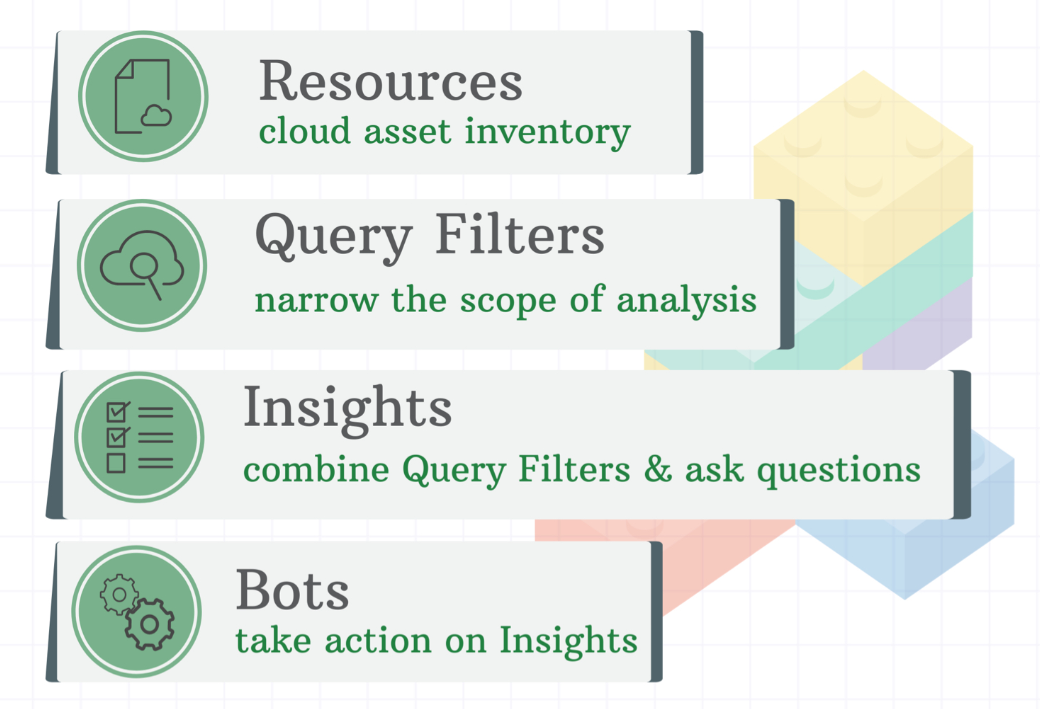
Starting with your Resources, Cloud Security capabilities allow you to refine your view by applying Query Filters to create Insights or Insight Packs, and then take action using Bots.
To view your resources:
- Log in to the Command Platform.
- Go to Assets & Identities > Resources.
Legacy UI
The resource categories and filtering options display. Click a resource type to open a results table. Use the Resource Type Search to find a particular type without having to navigate the resource categories tabs or know the Cloud Security normalized terminology. For example, searching for and selecting S3 Bucket can take you to the Storage Container resource.
Filter resources
You can modify the list of resources to display using Scopes, Query Filters, and the Global Search. At any point, you can filter the entire Resources view to only display resources owned by you, the current user, by clicking the person icon.
Apply scopes
There are four scope types available to help you filter your resource inventory.
To apply a scope:
- From the Resources page, click Scopes.
- Select a scope type:
- Clouds
- Optionally, use the Select Badges drop-down to filter the cloud accounts list using badges.
- Optionally, select Must Have all Badges to only show cloud accounts that have all selected badges. Otherwise, the list contains cloud accounts that have at least one of the selected badges.
- Select the checkbox next to each cloud account you want to show resources for. Scoping by a cloud account that contains a Kubernetes cluster will include the cluster and any of its related resources in the results.
- Kubernetes Clusters
- Select the checkbox next to each Kubernetes cluster you want to show resources for.
- Resource Groups
- Select the checkbox next to each Resource Group you want to show resources for.
- Applications
- Select the checkbox next to each Application you want to show resources for.
- Clouds
- Close the panel.
Apply Query Filters
Query Filters assist in answering specific questions about your resources. For example, finding resources older than a number of days, resources trusting a specific account, or resources with an Insight finding. Explore Query Filters for more details.
To apply a Query Filter:
- From the Resources page, click Query Filters.
- Use the search bar, Cloud Type Support, Resource Type Support, or categories to narrow the list of Query Filters.
- Optionally, click + to view details for a Query Filter.
- Click Apply. Often, Query Filters require additional configuration. You must provide the required configuration and click Apply again to finish applying the Query Filter.
Search for a resource
If you know a resource’s name, account ID, or provider ID, you can also perform a direct search for it.
To search for a resource:
- From the Resources page, click Global Search (magnifiying glass icon).
- Type a resource name, account ID, or provider ID.
- Click the resource to open the resource properties panel.
Modern UI
The Resources inventory is divided into three sections:
- Scopes & Filters - You can select a cloud account, Kubernetes cluster, resource group, application, or Query Filters to limit the scope of the displayed inventory. You can also select the Resources owned/provisioned by me checkbox to automatically filter the list to show resources owned or provisioned by your username.Want to know more about Query Filters?
Query Filters assist in answering specific questions about your resources. For example, finding resources older than a number of days, resources trusting a specific account, or resources with an Insight finding. Explore Query Filters for more details. - Resource Index - You can select a resource type to limit the scope of the displayed inventory. Hover your cursor on a type to see the different resources associated with a type.
- Resources - Your results are displayed at the bottom of the page in the Resources table.
To apply a scope:
- Click Add Scope.
- Select a scope type:
- Clouds
- Optionally, use the Select Badges drop-down to filter the cloud accounts list using badges.
- Optionally, select Must Have all Badges to only show cloud accounts that have all selected badges. Otherwise, the list contains cloud accounts that have at least one of the selected badges.
- Optionally, use the Search Clouds text box to filter the cloud accounts list based on a text string.
- Select the checkbox next to each cloud account you want to show resources for. Scoping by a cloud account that contains a Kubernetes cluster will include the cluster and any of its related resources in the results.
- Kubernetes Clusters
- Select the checkbox next to each Kubernetes cluster you want to show resources for.
- Resource Groups
- Select the checkbox next to each Resource Group you want to show resources for.
- Applications
- Select the checkbox next to each Application you want to show resources for.
- Clouds
- Close the panel.
To apply a Query Filter:
- From the Resources page, click Add Query Filter.
- Use the search bar, Cloud Type Support, Resource Type Support, or categories to narrow the list of Query Filters.
- Optionally, click + to view details for a Query Filter.
- Click Apply. Often, Query Filters require additional configuration. You must provide the required configuration and click Apply again to finish applying the Query Filter.
Interact with resources
All resources matching your selected scopes and Query Filters are displayed as a table beneath the resource categories. The table displays different columns, or properties, depending on the resource type selected. For example, properties for a Database Snapshot may include Snapshot type, Size, and State. Properties describing a Storage Container may include Total Objects, Size, and Logging Bucket.
View resource properties
Cloud Security harvests a wealth of information for each resource. These properties are used to build Query Filters and Insights, which build the foundation for the rich set of features available to you.
To view resource properties:
- From the Resources page, optionally filter your inventory.
- Click a resource category tab.
- Click a resource type. A table appears.
- Click Resource Properties next to the resource you want to explore. A side panel opens.
The resource properties panel opens to the Properties tab by default. This tab contains all of the properties harvested by Cloud Security for a particular resource type. The rest of the tabs may differ between resource types.
Most resources have a Direct Link property available on the resource properties panel that is a direct URL to viewing a particular resource within a given cloud service provider’s console. You can also use direct links with Jinja2 to create notifications that link to the resource. Explore the Jinja 2 reference page for details on how.
The following are some important tabs you might see:
- Risk - Provides a summary of the risk associated with a resource. Explore the Layered Context documentation for details.
- Sensitive Data - Lists a summary of sensitive data findings. Explore Data-centric risk prioritization for details.
- Public Access - Lists the Insight findings that Cloud Security used to determine whether a resource is publicly accessible from the internet.
- Insight Findings - Lists all Insight Findings associated with a resource. Explore the Insights documentation for details. You can also create Exceptions from this tab.
- Source Documents - Provides a JSON document that surfaces raw data about the resource. Explore the Source Documents section for details.
- Related Resources - Lists all resources that are related to a given resource. Explore the Related Resources documentation for details.
Assess public accessibility
Cloud Security uses a variety of Insights and Query Filters to determine if a given resource type is publicly accessible. For example, public accessibility for the Instance resource type can be identified with the Compute Instance Open To The Public Insight. Each resource type may have multiple Insights that assess public accessibility.
Some resource types have metadata or settings associated with them that can be used to determine public accessibility (for example, Storage Containers).
To view public access:
- From the Resources page, optionally filter your inventory.
- Click a resource category tab.
- Click a resource type. A table appears.
- Click Resource Properties next to the resource you want to explore. A side panel opens.
- Click Public Access.
If the selected resource is public, the tab displays a list of Insights that were used to determine this. If the selected resource is an Instance or Container (AWS EKS only) that is public, you can view the evidence graph (a simplified Attack Path) and the Public Accessibility Allow List.
The Rapid7 external scanner checks supported public resources every 24 hours for open ports to validate findings. The results and any associated security impact are shown on this tab. To enable the external scanner in System Administration > Public Accessibility, you must be a Domain Administrator.
To view external scanner results (validated public findings):
- From the Resources page, click Add Query Filter.
- Search for
validated. - Click Apply next to the applicable Query Filter (for example, Instance Open to the Public (Validated)).
- Click a resource’s Name. The Resource Properties panel opens.
- Click the Public Access tab. External scanner results open:
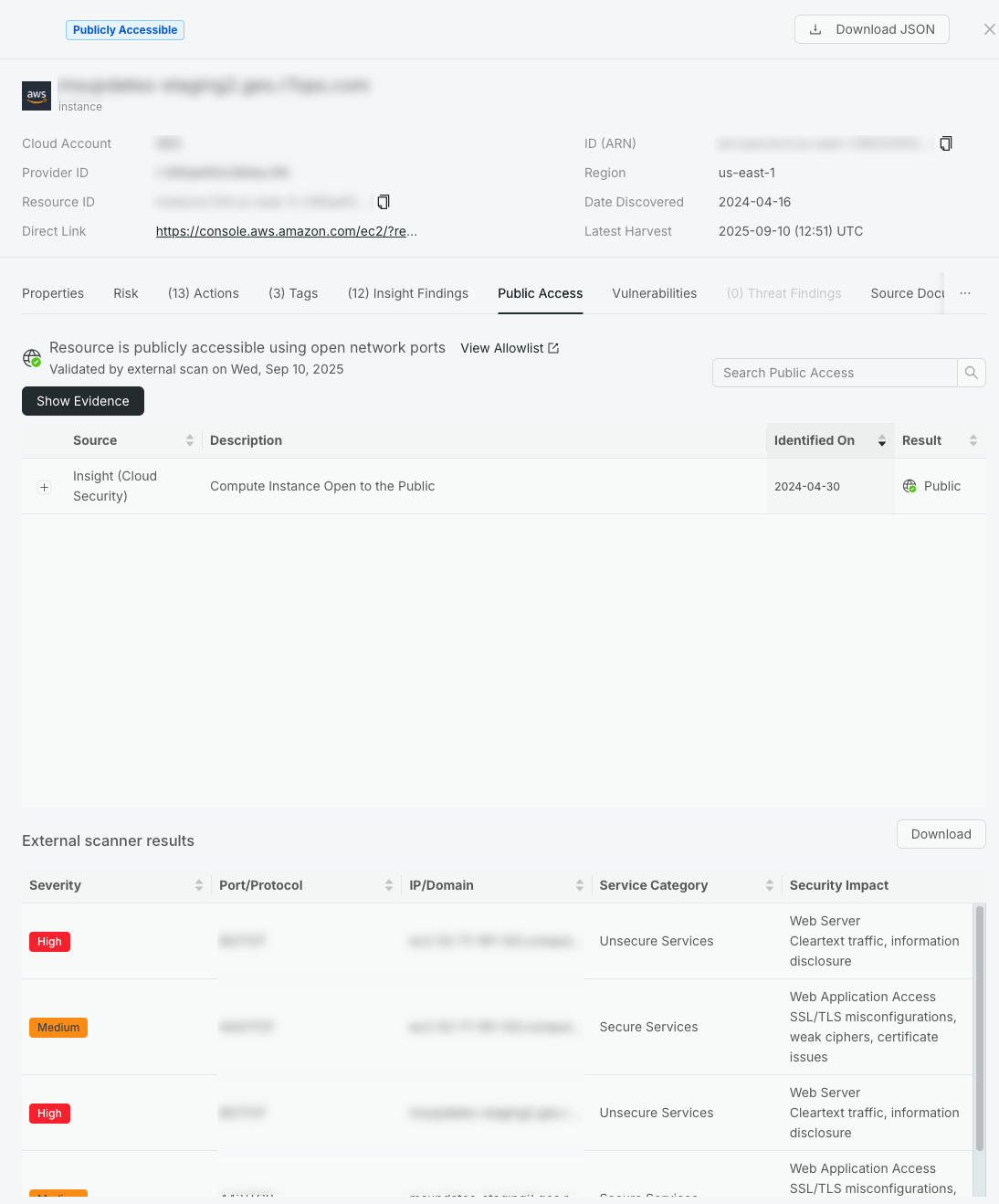
You can click Show Evidence to open a validated Attack Path.
Download resource data
All resource data is available for download. There are three different viewing experiences:
To download data for multiple resource types:
- From the Resources page, optionally filter your inventory.
- Click Download Resources.
- Select the resource types to download data for.
- Optionally, select badges to filter the resources downloaded.
- Optionally, select tags to filter the resources downloaded.
- Click Download Resources.
To download data for a single resource type:
- From the Resources page, optionally filter your inventory.
- Click a resource category tab.
- Click a resource type. A table appears.
- Click Download. A file downloads asynchronously.
To download data for a single resource:
- From the Resources page, optionally filter your inventory.
- Click a resource category tab.
- Click a resource type. A table appears.
- Click Resource Properties next to the resource you want to download. A side panel opens.
- Click Download JSON.
View Source Documents
For select resource types, there is an additional tab, Source Documents, that surfaces raw data about the resource harvested directly from the Cloud Service Provider (CSP). This additional context about your resources can help to further investigate configuration issues or provide deeper analysis.
Click into the document viewing area, then use ⌘F (macOS) or CTRL+F (Windows) to search through the data. This data is also included with the resource download or can be viewed and copied directly from the Source Documents pane.
Supported Resources
Support for this feature is currently available for the following lists of resource types, but more types will be supported over time The Source Documents tab will inform you if the selected resource is not supported.
Source Documents - Supported AWS Resources
Amazon DocumentDB
Amazon Macie
Amazon MemoryDB for Redis
Amazon MQ
Amazon OpenSearch Serverless
Amazon Redshift (Snapshot)
Amazon Sagemaker (Notebook)
Amazon Timestream
Amazon Transcription
API Gateway (Domain, Key, Stage)
Athena (Workgroup)
AWS App Runner
AWS AppSync
AWS Auto Scaling (Group, Launch Configurations)
AWS Backup (Vault)
AWS Glue (Data Catalog, Security Configuration)
AWS Outposts
AWS Transfer Family (SFTP Server)
Batch (Compute Environment)
CloudFront
CloudHSM
CloudTrail
CloudWatch (Alarm, EventBridge event bus, Log Group, Rule)
Codebuild Project
CodeCommit
Cognito (User Pool)
Container Image (ECR)
DataSync (Task)
Direct Connect
Directory Service
Dynamo DB (Accelerator (DAX))
DMS Replication Instance
EC2 Instance (Amazon EBS Snapshot, Amazon EBS Volume, Launch Template, SSH Key Pair)
EFS
Elastic Container Service/Fargate (Cluster, Container Task, Task Definition)
Elastic Container Registry (Container Image)
Elastic IP
Elastic Kubernetes Service (Cluster, Container Instance, Node Group)
Elastic MapReduce
Elastic Network Interface (ENI)
Elastic Transcoder (Pipeline)
FSx
IAM (IAM/ACM SSL Certificate)
IAM Policy (Customer-Managed)
Key Management Service
Kinesis (Data Firehose)
Kinesis Video Stream
Lambda
Managed Apache Airflow (Environment)
MSK (Instance)
NACL/Security Group
NACL/Security Group Rules
Neptune
RDS (Aurora, Aurora global database, Event Subscription, Snapshot)
Route 53 (DNS Zone, Resolver Configuration)
Recycle Bin
Region
S3 (Access Point)
S3 Glacier
Secrets Manager (Secret)
Serverless Application Repository
Shield
Simple Notification Service (Subscription)
Simple Queue Service
Step Function State Machine
Storage Gateway (NFS/SMB File Share)
Systems Manager (Parameter Store (Parameter), Document)
WorkSpaces (Instances)
VPC (Endpoint/PrivateLink, Elastic Network Interface (ENI), Flow Log, Internet Gateway, Peer, Managed Prefix List, NAT Gateway, Route, Route Table, Site-to-Site VPN, Subnet, Traffic Mirror Target, Transit Gateway, Virtual Private Gateway)
VPC Subnet
Source Documents - Supported Azure Resources
API Management Service
App Registration
Azure Cosmos DB
Azure Databricks (workspace)
Container instances
Data Factory
Event Grid Topic
ExpressRoute circuits
Federated Azure AD Group
Federated Azure AD User
Firewall
Image
IP Groups
Kubernetes Service
Logic App
Microsoft Entra ID (Group, Service Principal, User)
NAT Gateways
Network Security Group (Flow Logs)
Redis Cache
Role Definition
Security Rules
Service Endpoint/Service Endpoint Policy/Private Endpoint
Service Fabric Cluster
Snapshot
Storage Account
Subnet
Template Spec
Virtual Machine Scale Sets
Virtual Network (Gateway)
Web Application Firewall policies
Source Documents - Supported GCP Resources
Airflow Environment
Artifact Registry
Autoscalers
BigQuery Dataset
Bigtable
Container Cluster
Cloud Armor
Cloud Credentials
Cloud Function
Cloud KMS Cryptokey
Cloud KMS Keyring
Cloud Run
Cloud Spanner
Cloud SQL
Cloud SQL Backup
Data Factory
Dataflow Jobs
Dataproc
Direct Connect
DNS Zone
Domain Groups
Domain Users
Identity Platform Provider
Image
Instance
Logs Storage
NAT Gateway
Network
Network Flow Log
Network Peer
Pub/Sub Subscription
Pub/Sub Topic
Secret
Service Account Key
Service Certificate
Service Certificate Authority
Service Domain
Service Policy
Shared File System
Snapshot
Stackdriver Sink
Subnet
URL Map
Virtual Private Gateway
VPC
VPN TunnelDepending on the permissions you have applied to the harvesting roles associated with your cloud accounts, you can perform some basic actions within Cloud Security, including:
- Adding a resource to a Resource Group
- Assigning an owner to a resource
- Deleting a resource in Cloud Security and in the cloud service provider
- Start, stop, or reboot a resource
Actions vary by resource type and can change dynamically based on the resource selected.
To manage a resource:
- From the Resources page, optionally filter your inventory.
- Click a resource category tab.
- Click a resource type. A table appears.
- Select the checkbox next to the resource you want to manage. Supported actions appear in the results table.