Advanced Options
The Advanced Options screen enables you to minutely configure your scan template and provides options that are not available in other screens.
There are multiple types of elements in the Scan configuration:
- Scalar - Options that have a single value. For example,
JavaScriptEngine. - List - Options that can have a list of values. For example,
ScopeConstraintList.
Proxy Settings
| Name | Description | Format | Default Value | Additional Options | Type |
|---|---|---|---|---|---|
| Type | This parameter defines the type of proxy that will be used by Application Security | Enum | No Proxy | Common Options
- No Proxy (numeric 0): No proxy set. - Manual Config (numeric 3): User provides specific proxy server hostname and port number ( Http(s)Host, Http(s)Port).- PAC File (numeric 4): URL to PAC file server ( PacFile).Additional Options (Available only to AppSpider Pro and Enterprise Customers): - Internet Explorer Settings (numeric 1) - Firefox Settings (numeric 2) |
Scalar |
| HttpHost | The HTTP host domain for a proxy server. | String | None | None | Scalar |
| HttpPort | The HTTP port number for a proxy server. | Number | 0 | None | Scalar |
| HttpsHost | The HTTPS host domain for a proxy server. | String | None | None | Scalar |
| HttpsPort | The HTTPS port number for a proxy server. | Number | 0 | None | Scalar |
| PacFile | The PAC File URL for a proxy auto-configuration file server. | String | None | None | Scalar |
| Username | Field for username if proxy requires authentication. | String | None | None | Scalar |
| Password | Field for password if proxy requires authentication. | String | None | None | Scalar |
| Proxy Exclusions List | A list of specified URL domains allowed to bypass the proxy. (Manual Config Only) | None | String value with wildcard support (e.g., *.testfire.net for matching multiple subdomains.) |
List |
ScanConfig
| Name | Description | Format | Default value | Additional options | Type |
|---|---|---|---|---|---|
| JavaScriptEngine | Which browser used by the scan | Enum | Chrome | Chrome Internet Explorer Default |
Scalar |
CrawlConfig
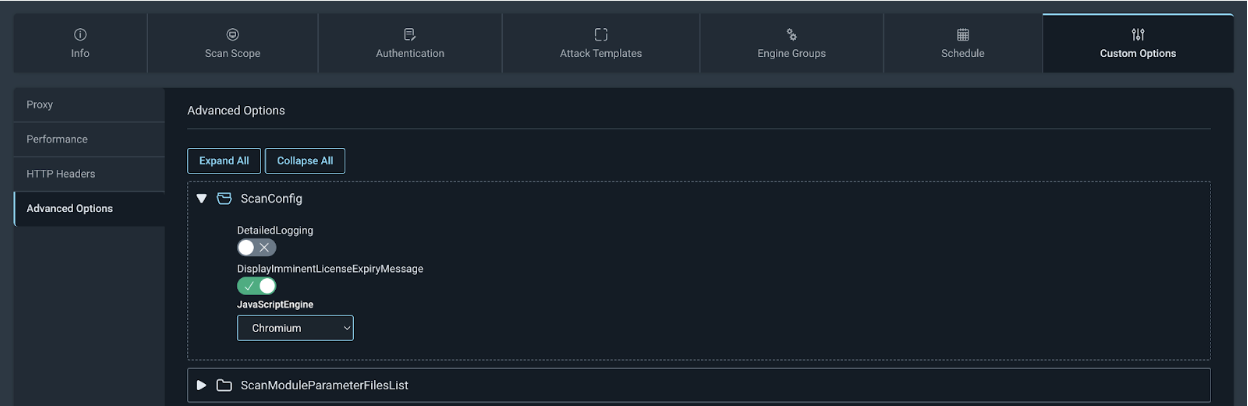
If you have upgraded the engine to version 7.5, the new crawling service is off by default but can be enabled using the following steps:
On Scan Config navigate to Custom Options > Advanced Options > ScanConfig and select Chromium from the JavaScriptEngine dropdown.
| Name | Description | Format | Default value | Additional options | Type |
|---|---|---|---|---|---|
| MaxDomain | Maximum number of domains that Application Security will crawl. | Number | 100 | None | Scalar |
| MaxCrawlResults | Maximum number of web resources that Application Security is allowed to retrieve from the server during the scan. A web resource is identified by a unique combination of a URL and a parameter (Query, POST). After that number is reached, crawling is stopped. | Number | 5000 | None | Scalar |
| MaxPerWebSiteCrawlResults | Maximum number web resource crawler is allowed to crawl per domain. | Number | -1 (unlimited) | None | Scalar |
| MaxPerDirCrawlResults | Maximum number of web resources in any directory the crawler is allowed to retrieve. | Number | 500 | None | Scalar |
| MaxPerLinkCrawlResults | Maximum number of web resources for a given link the crawler is allowed to retrieve. It limits how many resources that have the same URL but different variations of POST parameters can be crawled. | Number | 50 | None | Scalar |
| MaxPerNormalizedLinkCrawlResult | Maximum number of resources the crawler is allowed to request for a given normalized link. Normalized link is a URL without parameter values. | Number | 100 | None | Scalar |
| MaxPerDirChildNodes | Maximum number of child nodes in the directory the crawler is allowed to crawl. Child node is a directory or a file. This parameter does not count grand children. | Number | 300 | None | Scalar |
| MaxBlackListExtCrawlResults | Number of resources that have blacklisted based on extension the crawler is allowed to retrieve. This is per domain. | Number | 100 | None | Scalar |
| MaxAttackFeedbackLinksCount | Maximum number of new links discovered in attack traffic the crawler will insert in the queue. | Number | 300 | None | Scalar |
| MaxPerFileNameCrawlResults | Maximum number of Web Resources with the same file name the crawler is allowed to analyzed. | Number | 250 | None | Scalar |
| RecursionDepth | Maximum repetition that Application Security will tolerate in URL. | Number | 2 | None | Scalar |
| MaxDirDepth | Maximum number of directories AppSpider will look into. URLs that have more directories in their path than the value of this parameters will be ignored. For example, www.site.com/dir1/dir2/dir3/file.html will be ignored if MaxDirDepth parameter is set to value smaller than 3. |
Number | 10 | None | Scalar |
| DiscoveryDepth | Maximum discovery depth that Application Security can go into the site. Discovery depth of a URL is the number of steps that is required for the user to discover the link. | Number | -1 (unlimited) | None | Scalar |
| UrlRepetitionTolerance | Maximum number of identical normalized URLs Application Security is allowed to crawl. Normalized URL is the URL without query parameter values. | Number | 25 | None | Scalar |
| SequenceRepetitionTolerance | Maximum number of similar sequences that Application Security will try to follow. | Number | 5 | None | Scalar |
| MaxReportedImages | Maximum number of discovered image links that Application Security should store in the database | Number | 500 | None | Scalar |
| MaxReportedLinks | Defines maximum number of discovered Web Resources that Application Security should store in the database in addition to web resources that will be crawled by the crawler. | Number | 2500 | None | |
| MaxReportedComments | Maximum number of discovered HTML comments that Application Security should store in the database | Number | 500 | None | Scalar |
| MaxReportedScripts | Maximum number of discovered scripts that Application Security should store in the database. | Number | 500 | None | Scalar |
| MaxReportedEmails | Maximum number of discovered email addresses that Application Security should store in the database. | Number | 500 | None | Scalar |
| MaxReportedForms | Maximum number of discovered forms that Application Security should store in the database. | Number | 500 | None | Scalar |
| MaxBrowserPageWaitTimeout | Maximum time Application Security should wait for the Browser component to load the page and perform all operations. | Number. Time in milliseconds. | 60000 | None | Scalar |
| MaxBrowserWaitTillRequestTimeout | Maximum time Application Security should wait for the JavaScript on the page to send an AJAX request to the server after firing an event (for example, ‘onclick’ or ‘onmouseover’). | Number. Time in milliseconds. | 4000 | None | Scalar |
| MaxBrowserDOMDepth | Maximum depth of DOMs that Application Security should try to analyze within an HTML page. DOM depth is minimum number of user actions (events) that are required to reach that DOM from the initial DOM of the page. | Number | 4 | None | Scalar |
| MaxBrowserEventsPerLink | Maximum number of JavaScript events Application Security should fire per one link. A link is a URL without a query parameter and the fragment. | Number | 200 | Scalar | |
| MaxBrowserEventsPerCrawlResult | Maximum number of JavaScript events Application Security should fire per 1 web resource. | Number | 100 | Scalar | |
| MaxBrowserEventsPerDOM | Maximum number of JavaScript events Application Security should fire per one DOM view. | Number | 100 | Scalar | |
| NotInsertedLinkCountThreshold | Maximum number of ignored links that should be reported in the User Log. | Number | 2 | None | Scalar |
| CrawlPrioritization | Defines the algorithm that will be used to crawl the site. | Enum | Smart | FIFO(numeric: 0) Smart(numeric: 1) DirBreadthFirst(numeric: 2) FoundBreadthFirst(numeric: 3) FoundDepthFirst(numeric: 4) Juicy(numeric: 5) LoginFormDiscovery(numeric: 6) Login(numeric: 7) |
Scalar |
| FileNotFoundRegex | Regular Expression that is used by Application Security to identify custom 404 responses (File not found) | String | Default: (page|resource) (you requested )?(was not|cannot be) found | `Page not found | 404(.0)? - ((File (or directory )?not found) |
| ServerErrorRegex | Regular Expression that is used by Application Security to identify error responses from the web server. | String | None | None | Scalar |
| InvalidURLRegexAttack | Regular Expression that identifies URLs that comes from attack traffic as Invalid so that Application Security does not attack an invalid URL. | String | `[’”\(\)<>] | \d([-+] | %2[bd])\d |
| InvalidURLRegexCrawl | Regular Expression that identifies a URL that was discovered during crawling as Invalid so that Application Security does not crawl and analyze an invalid URL. | String | `((\s | %20)(OR | AND |
| LockCookies | Flags that tells Application Security whether it should preserve the value of the cookies supplied by the user in the Scan Configuration even if the web server requested to change the cookie. | Boolean | 1 | 1: lock cookie values 0: do not lock cookie values |
Scalar |
| CaseSensitivity | This parameter tells Application Security how to treat URLs of the web site. The website can have either a case sensitive or a case insensitive file system on the back end. | Enum | CaseSensitive | AutoDetect (numeric: 0) CaseSensitive (numeric: 1) CaseInsensitive (numeric: 2) |
Scalar |
| UniqueUrlsAcrossWebsites | Deprecated | ||||
| SaveReferences | This parameter controls whether the crawler should store cross-references in the database. | Boolean | 0 | 0: Do not save cross-references 1: Save cross-references |
Scalar |
| UseBrowser | Flag that tells the crawler to use browser to execute JavaScript event handlers. | Boolean | 1 | 0: Do not use browser 1: Use browser |
Scalar |
| ShowBrowser | Flag that tells the crawler to show browser window during traversing web site’s pages. | Boolean | 0 | 0: Do not show browser 1: Show browser |
Scalar |
| StayOnPort | Flag that tells the crawler to not deviate from the port of original seed URLs. This implies that all seed URLs should be on the same port if that option is enabled. | Boolean | 0 | 0: Crawler can request URLs from other ports 1: Crawler should stay on port |
Scalar |
| RestrictToMacro | This flag forces Application Security to not crawl any links other than the requests sent during macro execution. | Boolean | 0 | 0: Crawler can discover new links 1: Crawler should try to discover new links |
Scalar |
| RestrictToManualCrawling | This flag forces Application Security to not crawl any links other than the requests imported from proxy logs. | Boolean | 0 | 0: Crawler can discover new links 1: Crawler should try to discover new links |
Scalar |
| RestrictToSeedList | This flag forces Application Security to not crawl any links other than the seed links provided in the scan configuration. | Boolean | 0 | 0: Crawler can discover new links 1: Crawler should try to discover new links |
Scalar |
| RestrictToWebService | This flag forces Application Security to not crawl any links other than the web service requests. | Boolean | 0 | 0: Crawler can discover new links 1: Crawler should try to discover new links |
|
| RestrictToSelenium | This flag forces Application Security to not crawl any links other than requests performed during execution of Selenium scripts. | Boolean | 0 | 0: Crawler can discover new links 1: Crawler should try to discover new links |
Scalar |
| ImportCookiesFromTraffic | This flag controls what Application Security does with cookies that it finds in the imported traffic. | Boolean | 0 | 0: Ignore cookies 1: Import cookies |
Scalar |
| PageEqualThreshhold | This parameter sets the minimum value of the similarity coefficient above which two pages are considered to be identical. | Double | 0.95 | None | Scalar |
| PageSimilarThreshhold | This parameter sets the minimum value of the similarity coefficient above which two pages are considered to have same structure. | Double | 0.80 | None | Scalar |
| Flash | This flags tells Application Security whether it should analyze Flash files. | Boolean | 1 | 0: Should not analyze Flash files 1: Should analyze Flash files |
Scalar |
| EnableAdvancedParsers | Internal parameter. The value provided in the scan configuration file is overwritten. | ||||
| SearchForUrls | This flags tells Application Security whether it should try to find URLs in places other than HTML structure: comments, JavaScript or text. | Boolean | 1 | 0: Should not look for URLs in non-standard locations 1: Should look for URLs in non-standard locations |
Scalar |
| MaxWebResourcesOverhead | This flags tells Application Security how many links it can add to the crawl queue over the value specified in MaxCrawlResults parameter. Those extra links provide the Crawler with ability to pick more promising links to crawl. Without that parameter, the crawler would stop looking for new links once the queue is full. |
Number | 1000 | None | Scalar |
| SeedUrlList | List of seed URLs from which Application Security should start the scan. | List | |||
| ScopeConstraintList | This parameter contains rules that specify what URLs Application Security should crawl. | List | |||
| BlackListExtensionList | List of extensions that the crawler is not allowed to crawl. See parameter MaxBlackListExtCrawlResults for the list details. |
List | |||
| GrayListExtensionList | List of extensions that the crawler is not allowed to crawl if Web Resource with the specified extensions do not have query parameters. See parameter MaxBlackListExtCrawlResults for list details. |
List | |||
| BinaryExtensionList | List of file extensions that usually files with binary content have. | List | |||
| TextExtensionList | List of file extensions that usually files with text content have. | List | |||
| BinaryContentTypeList | List of content types that identify files with binary content | List | |||
| HTMLContentTypeList | List of content types that identify HTML content | List | |||
| TextContentTypeList | List of content types that identify text content | List | |||
| XMLContentTypeList | List of content types that identify XML content | List | |||
| BrowserDownloadWhitelistList | List of URLs that browser should always download | List | |||
| BrowserDoNotDownloadExtentionList | List of file extensions that should not be downloaded even if they were requested by the browser | List | |||
| BrowserDoNotDownloadContentTypeList | List of content type of files that should not be downloaded even if they were requested by the browser | List | |||
| LockedCookieList | List of cookie names that should not change value for the duration of the scan | List |
AttackerConfig
| Name | Description | Format | Default value | Additional options | Type |
|---|---|---|---|---|---|
| ParametersToAttackBeforeLimitingAttacks | None | None | Scalar | ||
| LinksToAttackBeforeLimitingAttacks | None | None | Scalar | ||
| MaxSameNameParameterAttackPoints | Determines how many parameter values that have the same name (query or POST) Application Security is going to attack. | Number | 50 | None | Scalar |
| MaxSameCookieParameterAttackPoints | Determines on how many pages a cookie can be attacked by Application Security. | Number | 25 | None | Scalar |
| MaxSameNameParameterAttackPointsPerLink | Determines how many parameter values that have the same name (query or POST) AppSpider is going to attack on links that have the same URL. ✱ | Number | 3 | None | Scalar |
| MaxNormalizedSameNameParameterAttackPointsPerLink | Determines how many parameters with the same normalized name Application Security is going to attack on links that have the same URL. Normalized name is the name of the parameter without array index or any other indexing type. | Number | 10 | None | Scalar |
| ScopeConstraint | A list of scope constraints that determines which URLs AppSpider can attack. If the that list is empty, Application Security will not attack URLs that do not comply with constraints specified for the crawler in CrawlConfig.ScopeConstraintList |
None | URL, Method, Match Criteria, Exclusion | List | |
| DefaultDoNotAttackParam | A list of parameter names that Application Security should not attack. This list should not be changed by the user. For convenience, user-defined parameters that should not be attacked are moved into a separate parameter: UserDoNotAttackParamList | None | Parameter Name, Match Criteria | List | |
| UserDoNotAttackParam | A list of parameter that AppSpider should not attack. | None | Parameter Name, Match Criteria | List |
MaxNormalizedSameNameParameterAttackPointsPerLink
For instance if a page has parameter params[1], params[2], params[3], all those parameters will have the same normalized name: params[].
AuthConfig
| Name | Description | Format | Default value | Additional options | Type |
|---|---|---|---|---|---|
| Type | This parameter defines the type of authentication that will be used by Application Security. | Enum | None | None (numeric: 0): No authentication Form (numeric: 1): Form-based automatic authentication Macro (numeric: 2): Macro is used to authenticate the user. The macro should be specified in parameter MacroFile. SessionTakeover (numeric: 3): The user will provide session cookies. SSORedirect (numeric: 4) Bootstrap (numeric: 5) |
Scalar |
| HttpAuth | Flag that tells that Application Security should use HTTP username and password from the config to login to site that use HTTP authentication (Basic, NTLM, Kerberos) | Boolean | 0 | 0: Should not use HTTP authentication credentials 1: Should use HTTP authentication credentials |
Scalar |
| ReloginAfterSessionLoss | Flag that specifies whether Application Security should re-login after it detected session loss. | Boolean | 1 | 0: Should not re-login. 1: Should re-login |
Scalar |
| LogoutDetection | Flag that specifies whether Application Security should try to detect whether it lost the session. | Boolean | 1 | 0: Should not detect 1: Should detect |
Scalar |
| UserAssistance | Reserved for future use | ||||
| AssumeSuccessfulLogin | Flag that defines whether Application Security should check if the user was logged in using the regular expression in parameter LoggedInRegex or it can just assume that the user was logged in.✱ | Boolean | 0 | 0: Use regular expression to detect whether the user was logged in |
1: Assume that the user was logged in. |
| VerifyNotLoggedin | This flag defines whether Application Security should verify that the session is not logged in before trying to re-login. If the session was logged in and that flag is set, Application Security will not try to re-login.✱ | Boolean | 1 | 0: Application Security will verify whether the session was not logged in. 1: Application Security will verify whether the session was logged in. |
Scalar |
| PostponeLoginAction | Flag that tells Application Security whether it should postpone crawling the link if the is defined in the action attribute of the login form. | Boolean | 1 | 0: Application Security will crawl the action link. 1: Application Security will postpone crawling of the action link. |
Scalar |
| CreateNonAuthenticatedSession | Flag that determines whether Application Security should create a non-authenticated session along with the authenticated session. This flag should only be set if the user provided authentication information in the scan configuration: login macro, username and password for form authentication. | Boolean | 0 | 0: Do not create non-authenticated session 1: Create non-authenticated session. |
Scalar |
| TreatFailedReloginAsError | The flag that tells Application Security what to do when it fails to re-login the user. If that flag is set, then the scan will stop if re-login is failed. If the flag is not set then Application Security continues with the scan with the logged out session. Note that the initial login is always treated as an error. | Boolean | 1 | 0: Do not treat re-login failure as an error and continue with the scan 1: Consider re-login failure as an error. |
|
| BlacklistSinglePasswordForms | This flag determines whether the crawler should send requests from forms that have one password field. | Boolean | 0 | 0: Allowed to crawl forms with one password field 1: Do not crawl forms with one password field |
Scalar |
| BlacklistMultiPasswordForms | This flag determines whether the crawler should sent requests from forms that have two password fields. | Boolean | 1 | 0: Allowed to crawl forms with two password fields 1: Do not crawl forms with two password fields |
Scalar |
| ResetCookies | This flag tells Application Security whether it should reset all cookies before every re-login. | Boolean | 1 | 0: Do not reset cookies that were in the session before re-login 1: Reset all cookies. |
Scalar |
| AccountType | Deprecated | ||||
| UsernameForm | The user name that will be used for form authentication. Only used if parameter Type is set to Form. |
String | None | None | None |
| PasswordForm | The user password that will be used for form authentication. Only used if parameter Type is set to Form. |
String | None | None | Scalar |
| UsernameHttp | The user name that will be used for HTTP authentication (Basic, NTLM or Kerberos). For NTLM authentication with domain, the format of username should be <domain>/<username> |
String | None | Nonne | Scalar |
| PasswordHttp | The user password that will be used for HTTP authentication (Basic, NTLM or Kerberos) | String | None | None | Scalar |
| AutoLogonSecurity | This parameter defines the scope for which Application Security should use Windows user identity for Integrated Windows Authentication. | Enum | AutoLogonSecurityMedium | AutoLogonSecurityLow (numeric: 0): An authenticated log on using the default credentials is performed for all requests AutoLogonSecurityMedium (numeric: 1): An authenticated log on using the default credentials is performed only for requests on the local Intranet AutoLogonSecurityHigh (numeric: 2): Default credentials are not used. Note that this flag takes effect only if you specify the server by the actual machine name. It will not take effect, if you specify the server by “localhost” or IP address. |
Scalar |
| LoginLinkRegex | Defines the regular expression that Application Security uses to determine whether a link is a login link (link used in login process) | String | `([log | sign]( -)?(in | on))` |
| LoggedInRegex | Defines the regular expression that Application Security uses to determine whether the user was logged in as a result of login macro execution or login form submission or any other type of supported authentication. | String | `[sign | log]( -)?(out | off)` |
| SessionLossRegex | Defines the regular expression that Application Security uses to determine whether the user was logged out. This regex is only applied to HTTP response body.Application Security applies that regex to all responses (as opposed to regular expression in SessionLossOnCanaryPageRegex). | String | please (re)?login
|
have been logged out | session has expired |
| SessionLossHeaderRegex | Defines the regular expression that Application Security uses to determine whether the user was logged out. This regex is only applied to HTTP headers. | String | `Location: [^\n]100((sign | log)(in | on |
| LogoutLinkRegex | Defines the regular expression that Application Security uses to determine whether a link is a logout link. This helps Application Security to stay logged in by not clicking on or requesting logout links. | String | `[sign | log | time]( -)?(in |
| LogoutPostBodyRegex | Defines the regular expression that Application Security uses to determine whether a request with POST data can cause session logout. This helps Application Security to stay logged in by not clicking on or requesting logout links. | String | `[sign | log | time]( -)?(in |
| CanaryPage | Defines the URL that Application Security will periodically request to determine whether the session was lost. Should be used in conjunction with parameter SessionLossOnCanaryPageRegex. |
String | None | None | Scalar |
| SessionLossOnCanaryPageRegex | Defines the regular expression that Application Security uses to determine whether a request with POST data can cause session logout. This helps Application Security to stay logged in by not clicking on or requesting logout links. Should be used in conjunction with parameter CanaryPage |
String | None | None | Scalar |
| FormSubmissionScript | Reserved for future | ||||
| SessionCookieRegex | This parameter contains the regular expression that Application Security uses to determine whether a cookie is a session cookie. The regular expression is applied to the cookie’s name only. | String | `\b(CFID | CFTOKEN | SESSION |
| SessionCookieLifespan | This parameter determines the maximum lifespan of the cookie below which the cookie is considered a session cookie. | Number (of days) | 32 | None | Scalar |
| LogoutDetectionFrequency | Deprecated | ||||
| DiscoveryMaxLinks | This parameter defines maximum number links that the login component can crawl in search for a login form. | Number | 200 | None | Scalar |
| LoginMaxLinks | This parameter defines the maximum number of links that the login component can crawl after submitting a login form while it is looking for the page that indicates that the user session was logged in. | Number | 50 | None | Scalar |
| DiscoveryDepth | This parameter determines how deep into the web site the crawler should go in search of the login form. The depth of a link is the minimum number of links (steps) that the user should visit to discover this link. | Number | 10 | None | Scalar |
| LoginDepth | This parameter determines how deep into the web site the crawler should go after the submitting login form in search of the page that can determine a logged in state. The depth of a link is the minimum number of links (steps) that the user should visit to discover this links starting from the page with the login form. | Number | 10 | None | Scalar |
| MaxMacroReloginAttempts | Maximum number of times Application Security should try to re-login.This parameter is not used for initial login, which is performed only once. | Number | 3 | None | Scalar |
| DiscoveryPrioritization | This parameter determines the algorithm the login form discovery crawler should use. It is not recommended to change the value from this parameter from the one selected by Application Security by default. | Enum | LoginFormDiscovery | FIFO(numeric: 0) Smart(numeric: 1) DirBreadthFirst(numeric: 2) FoundBreadthFirst(numeric: 3) FoundDepthFirst(numeric: 4) Juicy(numeric: 5) LoginFormDiscovery(numeric: 6) Login(numeric: 7) |
Scalar |
| LoginPrioritization | This parameter determines the algorithm the crawler should use after the submission of login form to find the page would indicate a logged in state, for example, “Welcome back to acme.com Bob”. It is not recommended to change the value from this parameter from the one selected by Application Security by default. | Enum | Login | FIFO(numeric: 0) Smart(numeric: 1) DirBreadthFirst(numeric: 2) FoundBreadthFirst(numeric: 3) FoundDepthFirst(numeric: 4) Juicy(numeric: 5) LoginFormDiscovery(numeric: 6) Login(numeric: 7) |
Scalar |
| MacroFile | Macro file that will be used for authentication. Note that this parameter is used only if Type value is set to Macro. |
Object | |||
| ScopeConstraintList | List of scope constraints for the login crawler that determine which part of the site the login crawler is allowed to crawl. Note that this parameter is only used when the Type value is set to Form. |
List |
AssumeSuccessfulLogin
This parameter is often used in conjunction with macro login when the user can see in the browser that Application Security logged in and does not want to craft a regular expression that detects a logged in state.
VerifyNotLoggedin
If during scanning a false positive logout was detected in a responses, Application Security will try to re-login into session that was perfectly valid. This parameter configures how Application Security behaves in this situations. If the value of the parameter is set to 1, Application Security first check whether the user is already logged in, prior to starting login process. If it is set to 0, Application Security will reset session .