Review Vulnerability Details
To determine the priority of and next steps for a vulnerability, review the information available for each vulnerability. To prioritize which vulnerabilities should be reviewed first, use the vulnerability status and vulnerability severity. After reviewing the vulnerability attack and detection details, and completing any further testing required to get a full understanding of the vulnerability, you can manually update some of the vulnerability details.
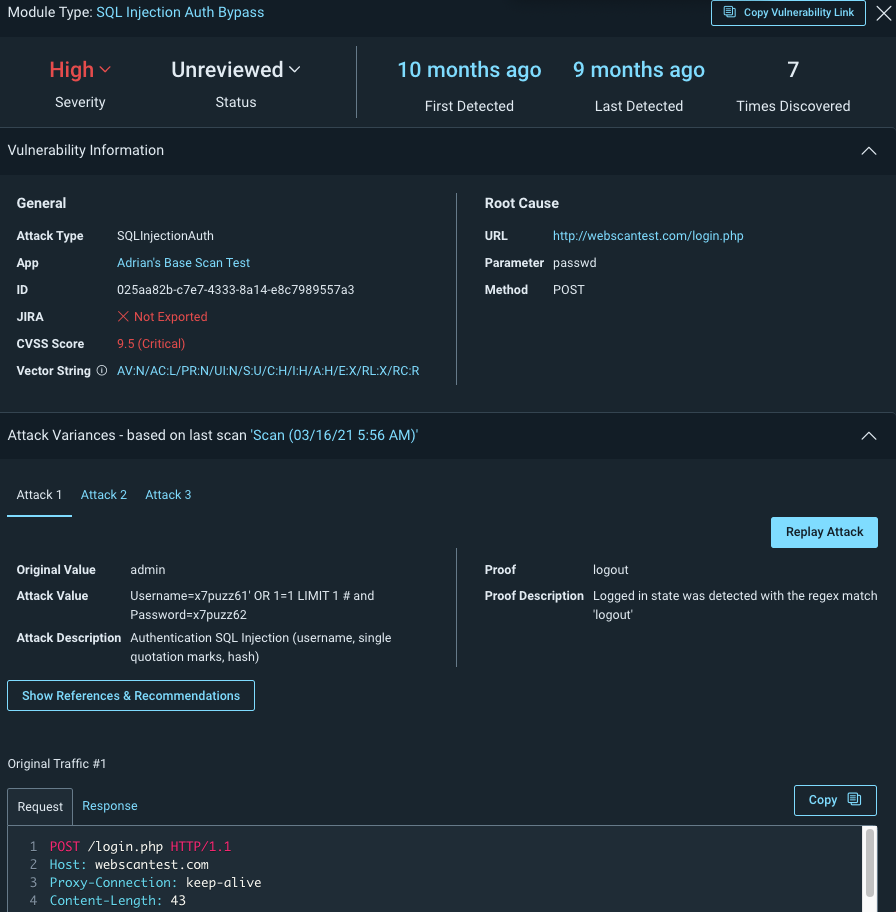
Review vulnerability details
The vulnerability details displayed in Application Security display information such as the vulnerability age and severity that you can use to determine the priority of the vulnerability. You can also dig deeper to view the request and response that the application used to determine the vulnerability was present.
 What can I learn from vulnerability details?
Vulnerability details include key information about the attack, response, and additional tracking fields that help you determine the best status and next step for the vulnerability. For example, before marking a vulnerability Ignored, you review the vulnerability details to help confirm that the vulnerability is not a risk.
Vulnerability status
Vulnerability statuses are automatically labeled Unreviewed when first discovered. After reviewing the vulnerability details, you can manually change the status to reflect the vulnerability status.
What do the vulnerability statuses mean?
The following statuses help you sort and prioritize your scan results:
| Status | When is it used? |
|---|---|
| Unreviewed | All vulnerabilities found by a scan that need to be reviewed. This is your starting point when reviewing scan results. |
| New | Newly discovered vulnerabilities that were not found in previous scans. These vulnerabilities are marked Unreviewed and are flagged as New until reviewed or found in a subsequent scan. |
| Ignored | Vulnerabilities that were identified as potentially harmful, but users reviewed and marked Ignored after. You may want to replay the attack or otherwise verify that the Ignored vulnerabilities do not pose a threat. |
| False Positive | Vulnerabilities that users flagged as having been incorrectly found by the Application Security. Users can change the status of False Positive vulnerabilities during the investigation process. This status does not change in subsequent scans. |
| Verified | Vulnerabilities that users investigated and determined to have legitimate risk. Users change the status to Verified to show that it needs to be remediated. |
| Remediated | Vulnerabilities that were identified, investigated, and fixed. Users and validation scans can change the status to Remediated. If an issue is rediscovered in a subsequent scan, the status reverts back to Unreviewed. |
| Duplicate | Vulnerabilities that users determined share a similar source and can be tracked in a similar vulnerability. This status does not change in subsequent scans. |
Vulnerability severity
Application Security can be configured to attack different aspects of your application to identify response behaviors that make your applications vulnerable to attackers. The attacks are run during scans and after the scan completes, you can view vulnerabilities by app or scan and details about each vulnerability.
Application Security provides two ways to prioritize vulnerabilities by severity:
- CVSS v3.1 severity, a numerical value (0-10) and associated vector string calculated using the CVSS calculator for principal characteristics of a vulnerability. For more information on CVSS scores, vector strings, and calculations, check out the CVSS specification document.
- Severity level assigned to the type of vulnerability, which can either be the default module severity or the selected severity from a custom attack module.
How are vulnerability severity ratings assigned?
Identified vulnerabilities will be assigned a severity rating which is set based on the likelihood of a finding being exploited and the potential impact it could have.
Vulnerability likelihood includes concerns such as whether there are exploits available and whether automated tools for the exploit are easily accessible. On the other hand, vulnerability impact takes into account how much an attacker could do if they were able to successfully exploit the given application via the identified finding, such as whether they might be able to execute code or a remote command, access application data or session information, or even expose sensitive data.
The table below highlights how Rapid7’s application security experts classify severity ratings per vulnerability based on these key factors.
| Vulnerability likelihood | Potential Impact | |||
|---|---|---|---|---|
| Low | Medium | High | Critical | |
| Low | Info Severity | Low Severity | Medium Severity | High Severity |
| Medium | Low Severity | Medium Severity | High Severity | Critical Severity |
| High | Medium Severity | High Severity | High Severity | Critical Severity |
| Critical | High Severity | Critical Severity | Critical Severity | Critical Severity |
Application Security also has the concept of ‘Safe’ for severities. This is a legacy Severity type which denotes findings that have no impact on the risk associated with or security of the application, but may be insightful to teams for other reasons. These findings can be safely ignored, and no remediation is required.
What do vulnerability severity ratings mean?
The higher the likelihood of a vulnerability being exploited and the higher the potential impact of an exploit will result in a higher overall severity rating. The different severity ratings indicate the potential exposure in your application, the seriousness of each threat, the attention that should be given to each vulnerability identified and how that should be prioritized and addressed.
Critical severity is a new classification that has been added to aid urgent prioritization for remediation teams.
The table below highlights how Rapid7’s application security experts classify severity ratings per vulnerability based on these key factors:
| Severity | Description | Recommendation |
|---|---|---|
| Critical | The most serious findings which require immediate attention. These findings are vulnerabilities which can completely compromise a web app. This includes any findings that, in a reasonable worst-case scenario, can lead to server-side arbitrary code execution, unrestricted data access, or the exfiltration of sensitive and business-critical information. | Address these findings urgently, especially if they occur in a production environment. |
| High | Weaknesses which can lead to very consequential exploits. These findings present a significant risk to multiple users, or to the integrity and availability of the web application itself. Examples include stored client-side code execution, weak protections on credentials and session information, and the ability to manipulate files on the web app in unexpected ways. | These findings should be prioritized for resolution in your remediation schedule after Critical severities have been addressed. |
| Medium | Vulnerabilities with a restricted impact or high complexity compared to high severity findings. In this category, exploits require more advanced techniques or have more limited outcomes for a malicious actor. Examples include reflected cross-site scripting, unvalidated redirects, and leaking information in stack traces. | These issues should be resolved, but should not take priority over higher severity findings. |
| Low | Low severity vulnerabilities usually represent a lack of expected protections, or the presence of any information which could be useful to an attacker. Low severity findings often have limited potential for serious impact. However, when used in conjunction with other exploits and advanced techniques, there is still a risk of consequential outcomes in some circumstances. Revealing server information in headers and lacking attributes which enhance security in cookies count as low severity findings. | These issues should be resolved, but should not take priority over higher severity findings. |
| Informational | Findings in this category are not vulnerabilities, but can help inform you about the site’s structure, or serve best practice recommendations. Browser detection via the User-Agent header and the use of caching are both identified in this category. | There is often no action that needs to be taken with these findings. Where best practice recommendations are made, it is important to consider if the general advice applies in your specific circumstances. |
What’s the relationship between Severity and CVSS?
Severity and CVSS are independent of each other and do not affect one another. These are two separate scores which use different methods to calculate the severity of a vulnerability.
Severity is Rapid7’s own method for determining the severity of a vulnerability in InsightAppSec. The ratings are Info, Low, Medium, High, and Critical. This rating is based on Rapid7’s own insights and experiences, taking into account several factors, including attack module and complexity of attack required. This score can be changed by users (depending on level of permissions) to reflect mitigating factors that the user believes may impact the overall vulnerability.
CVSS is a widely-used industry standard that is determined using the CVSS 3.1 calculator. This is a numerical score of 1-10. Unlike Severity, this score cannot be changed by users in InsightAppSec. As CVSS is a well-established scoring method, it gives an insight into the kind of vulnerability severity scoring that other organizations use.
By using both you can compare the Application Security Severity score with the CVSS score. The CVSS score may show a different severity level than the Severity score due to scan configuration or user adjustment during verification. For example, a user reviews a vulnerability with high CVSS and Severity scores and determines that because the app is isolated, the risk is actually low. Where significant score differences occur, you can review the vulnerability history and details to verify the correct level.
Attack and detection details
To help you better understand the vulnerability, review the vulnerability details.
Module
The attack used that resulted in the vulnerability.
Detection
When the vulnerability was first and most recently discovered, as well as how many times it was detected.
General Information
A link to the app where the vulnerability was found, a unique hexadecimal ID for the instance, and an indicator of whether this instance of the vulnerability was exported to Jira.
Root Cause
The URL of the web resource where the vulnerability was found and the HTTP request parameter and method that was used for the attack.
Attack Variance
Application Security can attempt multiple variations of the same attack on a URL to ensure the security of your applications against a variety of attacks. For example, you may have protected your application against some special characters in web forms, but not others. The Attack Variances section contains multiple tabs for each variation of an attack attempted by Application Security.
Attack variance includes information about the following:
- Attacks
- Type
- Value
- Traffic snapshot
- Description
- Original. The original, non-malicious value of the parameter, which is used to observe normal behavior of the app.
- Value
- Traffic snapshot
- Error
- System error message
- In-depth description
In addition to viewing attack variance information and snapshots, you can replay the attack.
History
Discovery history
The Discover History shows a list of all the scans where this vulnerability has been found in your environment.
If a vulnerability was last discovered in a scan over 6 months ago, the vulnerability may have been resolved. Test the vulnerability to determine if it’s still active.
Change History
The Change History shows the time a status update or severity change was made on a vulnerability, the event, and which user made the change.
Comments
Comments are a great way to add notes to yourself, communicate your comments to anyone else who is looking at the vulnerability, and learn about any previous discoveries about the vulnerability. Admins can add, edit, and delete any comments. Users with read-write access to the app can add comments and edit and delete their own comments. Users with read-only access to the app can view comments.
Update vulnerabilities based on vulnerability review
Change vulnerability status or severity in the vulnerability details
Ensure you have reviewed all vulnerability details to get an accurate understanding of the vulnerability before changing its status or severity.
- In the vulnerability details, change the status.
- To change the status, click the Status field and select a status.
- To change the severity, click the Severity field and select a severity.
Best Practice: In the Comments section, add notes about the reason for the status or severity change.
The vulnerability status is updated for all users to see.
Bulk update vulnerability status or severity from the vulnerabilities page
Ensure you have reviewed all vulnerability details to get an accurate understanding of the vulnerabilities before changing their status or severity.
- On the vulnerabilities page, select one or more vulnerabilities.
- To change the status, click Change Status and select a status.
- To change the severity, click Change Severity and select a severity.
Best Practice: In the Comments section of each selected vulnerability, add notes about the reason for the status or severity change.
Review status and severity change history
If you have a vulnerability with an unexpected status or severity, or notice that a vulnerability has a different status or severity than the last time you looked, you can use the Change History and Comments sections to learn more.
Check the Change History section for the user name and date of the change, as well as the Comments section for any applicable notes on the reason for the change. If you disagree with a status or severity change, use the Comments to ask for justification and add your own comments about why you would change it.
Oops! I accidentally changed the status or severity on a lot of vulnerabilities. How do I fix it?
Don’t worry, you can bulk change the severity back to one status or severity. You can also update the status and severity for individual vulnerabilities. Not sure what the original status or severity was? Check the History field in the vulnerability details.
Share vulnerabilities and results
Use the Copy Vulnerability Link button to copy and share the link to the vulnerability information. You can share this link with anyone, however only users with valid login credentials for InsightAppSec will be able to see it.